Re-use your Person class and extend it for usage in an HR application.
Create and Employer class, with an additional employer number, a salary and a department he/she/it belongs to.
Re-use your Person class and extend it for usage in an HR application.
Create and Employer class, with an additional employer number, a salary and a department he/she/it belongs to.
In the last section, we learned about the concept of setters and getters. Now adapt that knowledge and update your previously written Person class to make use of this concept.
Setters allow you to…
Getters allow you to…
Both…
Of course the sun is not always shining.
Don’t hesitate to assign a value to an instance of your rewritten person class, that does not exist. Like forgetting the R in firstName.
var myPerson = new Person('Maks','Nemisj','2016-06-07');
myPerson.fistName = 'Maik';
console.log(myPerson);
It can be avoided with Proxies, but that solution is more expert class than introduction. See here: https://dzone.com/articles/why-getters-and-setters-are-a-bad-idea-in-javascri
Now we saw how to produce setters and getters and how to use them. Let’s move forward the the concept of inheritance.
First step to take: plan your class. Ask yourself
In order to make your future class easy to use in code, name it by a noun (thing-word / concept) and use singular, because regardless of how many instance objects you will create, the class is one single blueprint for it.
By convention use an Uppercase letter at the first position, to later distinguish between e.g. calling an objects attribute or method, or a classes given static method.
Let’s return to an earlier example: A Person

What could be possible be important attributes to record inside our class?
So far we recorded
any other ideas?

in this picture, we see some more physical attributes e.g.
and also some more abstract attributes, like
Always keep your use-cases in mind. Select only those attributes that are important now or in future for your work. Don’t select attributes without a known use-case for your project.
Methods will represent the functionality your class provides to you and other coders. Generally there are more or less categories of what methods do
As a convention (not a must, but best practice), methods usually use verbs (do-words) in infinitive form to describe their functionality. e. g. loadData, calculateVolume, addListener, removeItem. Think of the English sentence structure with subject predicate object, and get a feeling how your code will read like when writing statements of the shape object.method(parameter).
The English continuous verb forms read like passive, or more like questions to a reader.
Good verbalized method names help other coders to understand your class and re-use it. Finding a good method name also helps in the design process of classes, to decide if the granularity (size) of a method fits (does one method try to do too much things at once? it could be to heavy weight)
The general syntax of a class looks like this:
// Klasse is the German word for class
class Klasse {
  attribut1 = 0; // Attribut is German for attributes
  // … more attributes

  // This class constructor requires a parameter for
  // passing the default value for attribut1
  constructor (attribut1Defaultvalue) {
    // initialization of state
    this.attribut1 = attribut1Defaultvalue;
    // ... more initialization
  }

  methode1(parameter1) { // Methode is German for method
   // todo: place code
  }

  methode2(parameter1, parameter2) {
    // todo: place code
  }

  // ... more methods
}
// the age calculation will fail,
// if dateOfBirth doesn't contain a Date instance
calculateCurrentAge() {
// get the current Date
  let currentDate = new Date();
  // split start date components
  let syear       = this.dateOfBirth.getYear();
  let smonth      = this.dateOfBirth.getMonth();
  let sday        = this.dateOfBirth.getDate();

  // split end date components
  let eyear       = currentDate.getYear();
  let emonth      = currentDate.getMonth();
  let eday        = currentDate.getDate();

  // normalize day of month to 30, if bigger
  if (sday === 31) sday = 30;
  if (eday === 31) eday = 30;
  // (don't change February 28 or February 29)

  // linearize the components to a harmonized value range
  let startLinear = (eday + emonth * 30 + eyear * 360);
  let endLinear   = (sday + smonth * 30 + syear * 360);
  // return the floored difference
  return Math.floor((startLinear - endLinear) / 360);
}Now you know, how to plan own classes and write them down in code. Let’s move forward to some further concepts like setters and getters.
As mentioned in the introduction of general concepts, JavaScript as a language provides some basic classes for regularly returning tasks. Let’s learn how to use them before writing own classes.
Can you recall the lessons learned from the last section?
What is a class, what is it used for, what is it made of?
At first, to reference a class, you obviously need to know it’s name. Because you need this name to create an instance object from it.
Important base classes will be introduced to you by teachers or colleagues. During your professional career you will explore more frameworks and libraries and their documentation, to learn about their provides classes and their use.
In the world of object oriented programming, the creation of instance object is usually done by calling a so called constructor. In JavaScript you use the dedicated keyword new inside a variable definition instead.
A constructor is a special reserved-named method of a class. As a design choice of the classes writer, it can have none to many parameters, you may need to know to create an instance object.
To use any previously defined class, we have to create an instance (object) of that class. In code this looks like this:
var objectInstance = new PreDefinedClass();
executing this line, leads to the reservation of memory to keep the state of objectInstance and execution the method constructor (if there is one)
If the classes constructor defined parameters, you need to pass them within the brackets after the classname
var objectInstance = new ClassWithConstructorParams(10,'a');
Usually you will find some documentation of the class author telling you, if you need parameters. e.g. this one.
To have a function or method with the same name but different sets of parameters is called overloading in object-oriented programming languages. JavaScript does not support this concept, but overrides re-defined functions and methods instead. Calls will execute the latest evaluated definition of a function/method
The behavior that “fakes” overloading can be achieved by offering a method with the maximum of parameters analyzing which of them were passed to the function/method inside it’s code body.
Every time a function/method is called an arguments object is available inside it’s body. You don’t need to instance it yourself. The arguments object helps you to discover the numbers and types of the parameters given. This could for example look like this:
function welcome(firstname,lastname) {
  if(arguments.length ==0) {
    console.log("Hi");
  }
  if(arguments.length == 1) {
    console.log("Hi " + firstname);
  }
  if(arguments.length == 2) {
   console.log("Hi " + firstname + " " + lastname);
  }
  if(arguments.length == 3) {
   console.log("Hi " + firstname + " " + lastname +
   ", " + arguments[2]);
  }
}
Lets have a look at the pre-build Date class of JavaScript language. Following the documentation of Date class, we can instance it with several sets of parameters, what feels like an overloaded constructor.
Now you know, how to instance objects from classes, let’s use the instances now.
After instancing the object from class, you can calls methods of the object. This is done with the objects name followed by the dot (.) symbol and the methods name and brackets. The brackets are obligatory, even if the method has no parameters, to distinct the call from reading an attribute.
var birthday = new Date('1981-11-27');
var weekdayOfBirth = birthday.getDay();
Hint: the getDay()-method of Date class returns a number from 0 to 6 reflecting the day of the week, sunday=0, monday=1, thuesday=2 … saturday=6
There are a plenty of cases, where a developer writes add methods to classes, that should be available without instancing an object from a class.
So called ‘static’ methods are not called from an object instance (aka variable names), but from the class itself. A prominent example for these are all the calculation-methods of the build in JavaScript class Math. For example you can retrieve the square root of a number with the static method sqrt() of the Math class.
> var baseValue = 16;
> var squareRoot = Math.sqrt(baseValue);
> console.log(squareRoot);
16
You can find a complete list of Math classes static methods on several sources like: Mozilla MDN – Math
Like methods you can just define variables in your class to preserve an objects state. Usually this is done in the constructor, in the same step like the initialization of the values. Let’s look at this code-example of a class Box representing package boxes in a logistics context, where the measurement, material and weight are important things to know.
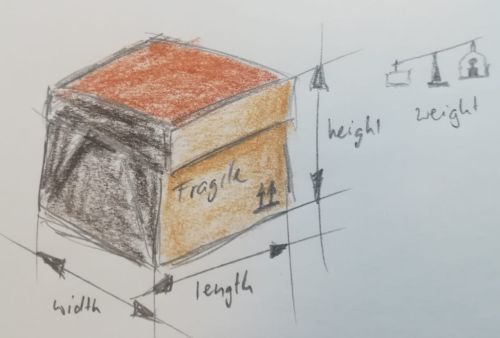
class Box {
     constructor (width, length, height, weight) {
         this.width = width;
         this.length = length;
         this.height = height;
         this.weight = weight;
     }
 }
var mybox = new Box(10, 5, 2, 2.5);
We can read and write the attributes of mybox by using the objects name followed by a dot (.) and the attribute name.
> mybox.width = 7.5;
> var volume = mybox.width * mybox.length * mybox.height;
> console.log(volume);
[output:] 75
In Math class, we saw earlier, their are a couple of constants defined, that can be read from Math class directly, without instancing a variable. Those constants behave like static attributes. But JavaScript again does not provide such a concept, but ways to provide the same use and feel.
The magic lays in the use of static get and set methods, we will see later. But just for using them without deeper knowledge. These examples work “like” static attributes from the Math class:
> var euler = Math.E;
> console.log(euler);
[output:] 2.718281828459045

> console.log(Math.PI);
[output:] 3.141592653589793
At this point, you know how to call methods and access attributes of objects and static methods directly from classes. Let’s continue writing your own classes.